
Exporting the Database
This is a continuation of the previous blogpost: 'Whatchu lookin at' - Investigating threat actors database activity
With my interest sparked, I dug deeper into what happens when a threat actor decides to export a SQL database directly from SSMS.
On several occasions we have observed the adversary exporting the SQL database with all its table through SSMS.
When a user wants to initiate a export, SSMS opens a process called DTSWizard.exe, used to export tables to formats like .txt or .csv.
DTSWizard.exe is found in C:\Program Files\Microsoft SQL Server\160\DTS\Binn
For examples sake, let's say the adversary opens SSMS, finds a juicy table containing all the results of the Pro Cycling Tour doping results.
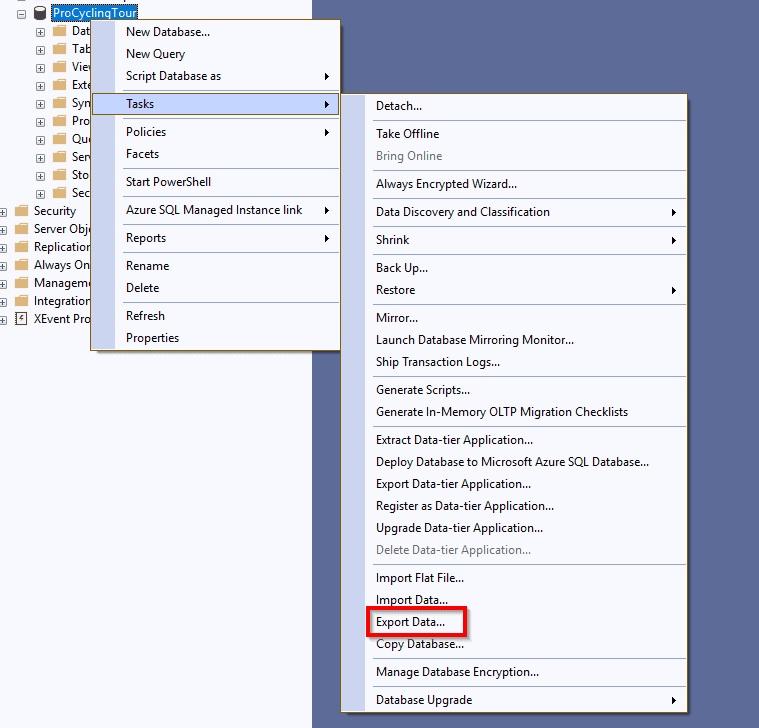
The adversary then clicks the "Export Data"-button, which opens the graphical DTSWizard.
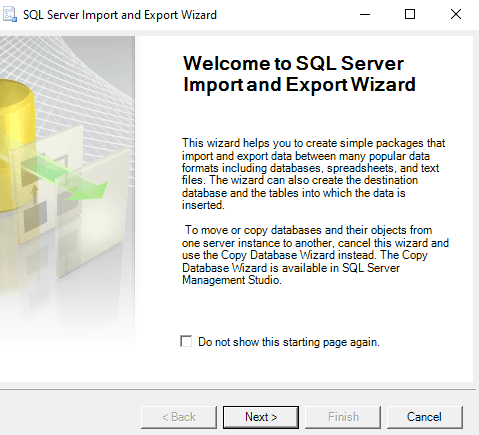
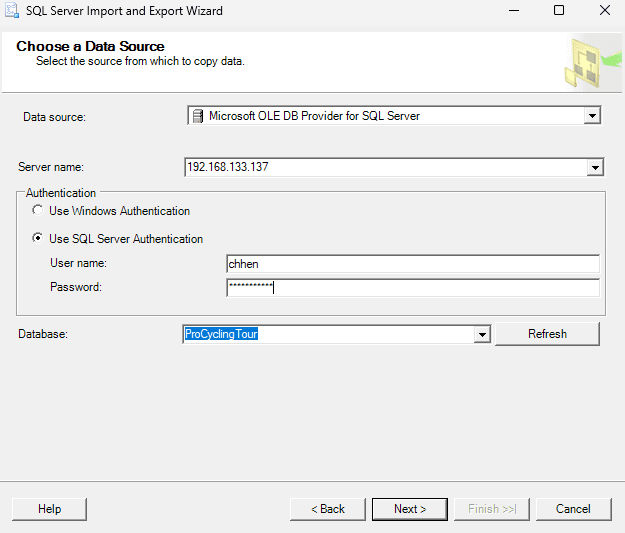
The threat actor can then select the ProCyclingTour database as source for the export.
The DTSWizard has several export options, however the adversaries we have seen, usually keeps it simple and exports it to a flat .txt or .csv file, with a file for each table.
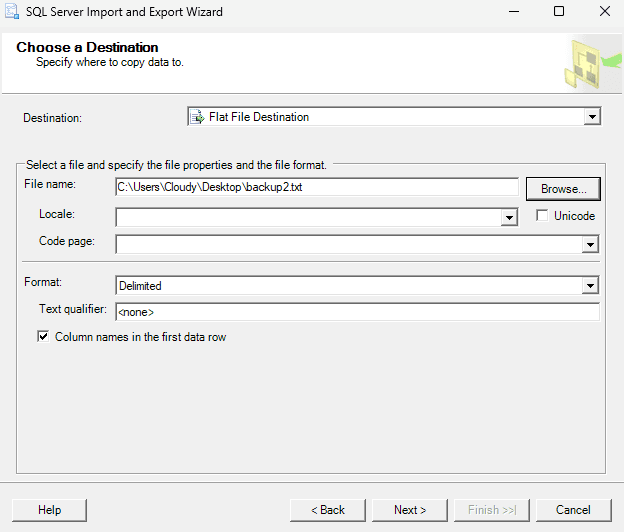
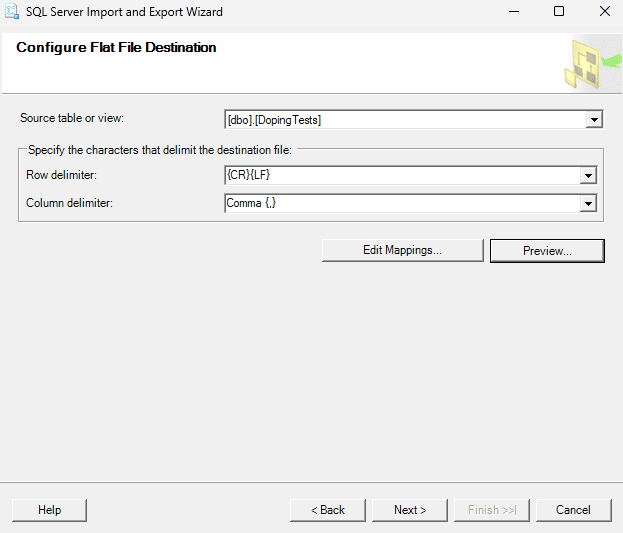
The image above shows the options that can be selected for the export. The export is exported as a text-file onto the Desktop with all the data in the DopingTests-table. The name of the file is backup2.txt.
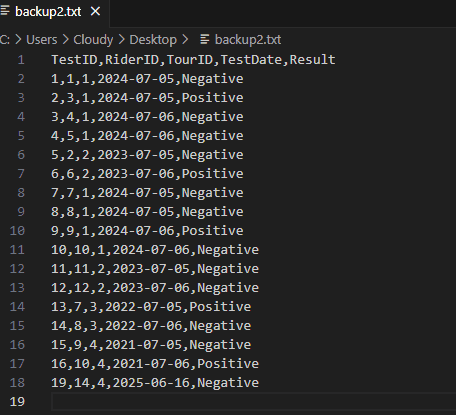
And the image above shows what the content of that table is in the flat file.
Now that we know what the export process looks like, we can figure out how to investigate it.
You can use process execution artifacts (e.g. CIDSizeMRU) to see that the DTSWizard has been launched, and if you can correlate the execution timestamp to the known adversary activity it might give you a clue about when data was staged for exfiltration. Or if you have EDR/Sysmon telemetry you would also be able to see the information there. Note that this will appear on the machine where SSMS is used from.
Additionally, as we now know, the export wizard will create the export file as a as a .txt or .csv, meaning we can investigate for a file-creation or interaction events of a txt file from artifacts such as the Jump lists or the $MFT.

Backup functionality
Another aspect worth looking at during an investigation, is the built-in backup feature in SSMS. This functionality acts as a GUI wrapper around the native BACKUP DATABASE query. This allows users or adversaries to create full or differential backups of a database directly through SSMS. It’s important to distinguish this from DTSWizard.exe, which is used for data import/export operations.
The purpose of the feature is to use the .bak file to restore the database in another SQL instance. Which gives the adversary full access to the database schema, data, stored procedures and other juicy information, if the .bak file is successfully exfiltrated.
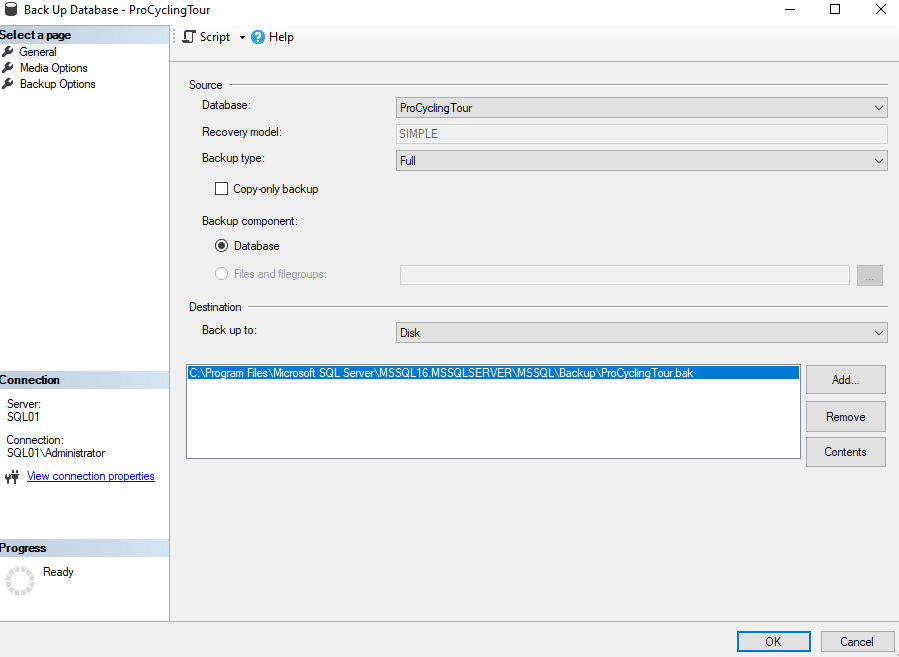
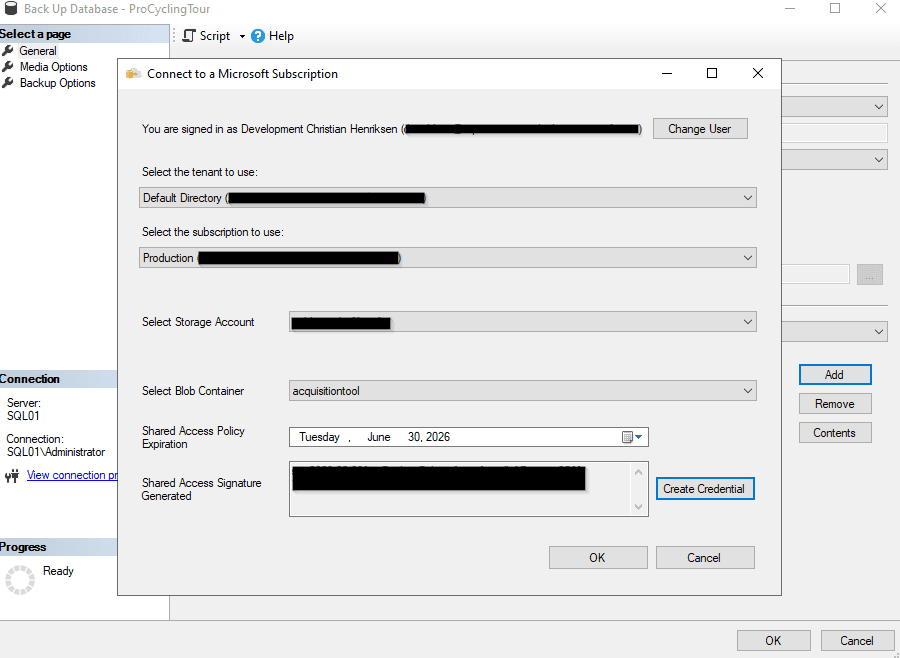
The wizard allows for either writing the backup to disk or uploading it to a storage container in Azure. The latter feature can be very convenient for TAs. Although this is not something we have seen TA’s actively using, but let's take a look at what kind of artifacts it produces.
For the upload to storage container option to work, the TA would have to sign-in with valid Entra ID account and specify the target Azure Storage Container to send the backup to, all the parameters can be specified in the backup wizard.
By analysing the process activity, we can see that once the backup to a storage container is started, a file named log_#.trc (default trace log) is written to, by the SQL process.
The log file is created in C:\Program Files\Microsoft SQL Server\MSSQL16.<SQL_INSTANCE>\MSSQL\Log.
Note that as indicated by the path, this log is related to the MSSQL server and not something from the SSMS program itself. So this log would be found on the server where the database is located.

The default trace log, records a bunch of server-side events. If you poke around in it, you’ll likely find the full URL of the storage container, which the database was backed up to, and exactly when it started. Solid stuff if you’re trying to confirm exfil.
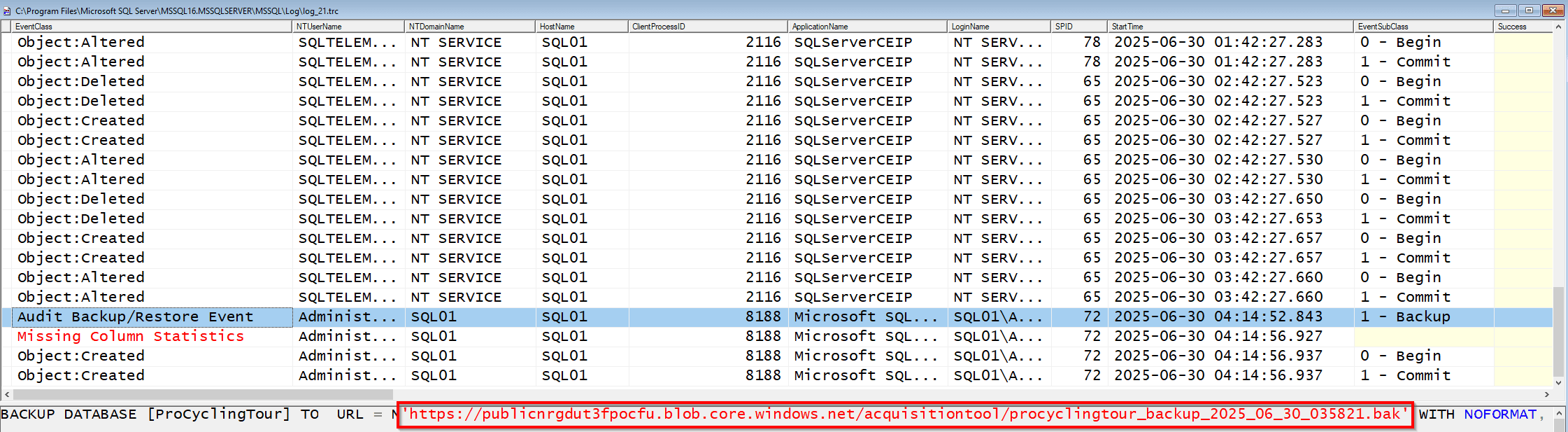
The log is only populated when the database is modified, for example with INSERT, DELETE and similar. Apparently, BACKUP is also logged here as well. Remember that trace logs are configured as rolling, with max 5 files at 20MB each, which means on noisy servers, older activity will disappear fast Collecting the Information in the Default Trace - Simple Talk.
If you’re doing triage ensure that you pull log_#.trc early or you risk losing key context around backup-based exfil.
It should noted that SQL Trace are deprecated by Microsoft and will be removed in future versions of SQL Server, however it is still present on my SQL Server 2022. SQL Trace - SQL Server | Microsoft Learn
I also noticed that the process that is shipping the backup is sqlservr.exe. We can see from ProcessMonitor that it is sending a stream of HTTPS traffic to 20.150.44.4, a Microsoft Data-center. Again, this would appear on the server and not necessarily where SSMS is used.
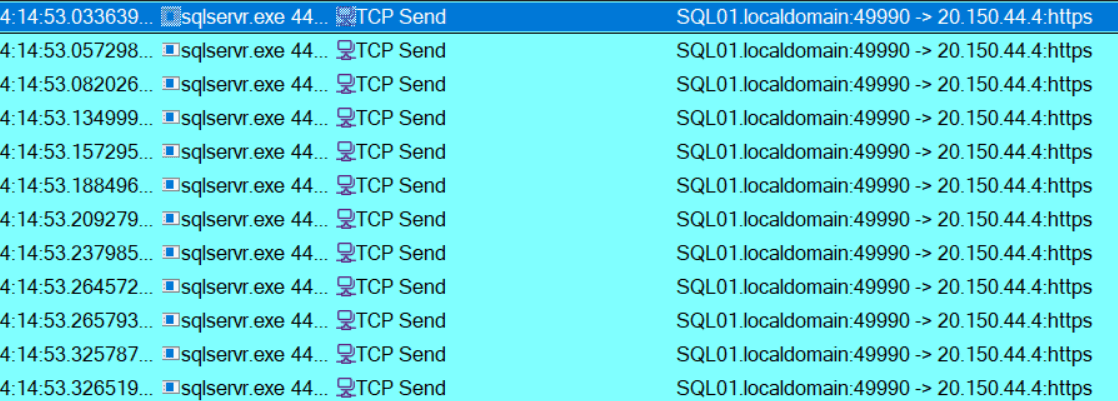
This kind of pattern showed up right after a backup was kicked off to the storage container. All of it’s over port 443, sourced from the SQL server. You might be able to create custom EDR alerts for this process, in an attempt to detect exfiltration by this method.
If you want to confirm how much data was actually exfiltrated with this method, you might have to rely on the SRUM network as it captures bandwidth usage of a specific application.
Backup History in msdb
Another place worth looking during an investigation is the SQL Server system database msdb. This database stores operational history for the SQL Server instance, including records of database backup and restore operations.
By querying the backup history tables in msdb we can identify which databases were backed up, the user who initiated the backup, when it started and completed, the backup type and size, and where the resulting backup file was written.
The query below retrieves this information from the msdb database. This provides a solid server-side artifact for confirming whether a database backup was created.
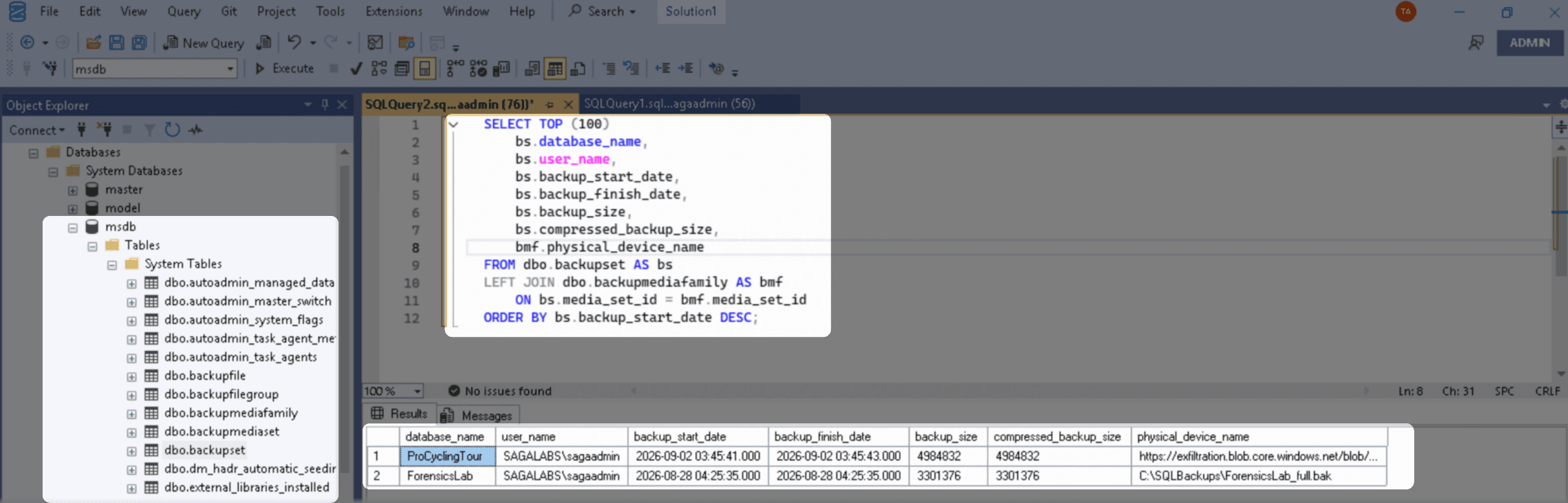
The image above shows two backups were initiated. It has a backup_start_date and backup_finish_date which assumes that the backup finished and potentially left the environment. In this case on of the backups were written to disk, and one shipped to a storage account container in Azure. This is identified by the physical_device_name column.
We can also see the exact backup_size both compressed and uncompressed.
And most interestingly we can also see that the user whom performed the backup tasks is SAGALABS\sagaadmin under the SQL login context.
MS documentation of the stored procedure sp_delete_backuphistory states that the backup history can be deleted either deliberately or routinely. However this does not run automatically, as it has to be triggered explicitly by automation or an administrator. This is important to know, as rows could be missing telling you something about exfiltration.
Conclusion
SSMS is a very convenient for modern adversaries, as it's already installed requiring no extra tooling to be brought into the compromised environment. But even in environments without SQL logging configured, the use of SSMS leaves behind some useful traces that we can use for our investigation.
I’m curious if others have run into this in the wild too. If you have seen similar SSMS artifacts during an investigation, I would love to hear about it, feel free to reach out.
I hope this series of blogpost gave you inspiration to do further research, and if you found something that I missed, please feel free to reach out.